INTRO
SmartArray 전용 레이드 관리 툴
megaraid 계열은 안됩니다. (storcli,perccli 사용해야 함.)
다운로드 :
- https://downloads.linux.hpe.com/SDR/repo/mcp/
ssacli
- ssacli 만 입력하면 CLI 모드로 전환 가능 / ssacli 명령 생략 가능
[root@localhost ~]# ssacli
Smart Storage Administrator CLI 6.45.8.0
Detecting Controllers...Done.
Type "help" for a list of supported commands.
Type "exit" to close the console.

=>
SSACLI
SHOW
전체 구성 확인 (slot 번호 모를 때 쓰면 좋음)
- ssacli ctrl all show config [detail]
# ssacli ctrl all show config

HPE Smart Array P408i-a SR Gen10 in Slot 0 (Embedded)  (sn: 0000)
   Internal Drive Cage at Port 1I, Box 1 (Index 0), OK
   Internal Drive Cage at Port 2I, Box 1 (Index 1), OK
   Port Name: 1I (Mixed)
   Port Name: 2I (Mixed)
   Array A (Solid State SATA, Unused Space: 0  MB)
      logicaldrive 1 (447.08 GB, RAID 0, OK)

      physicaldrive 1I:1:1 (port 1I:box 1:bay 1, SATA SSD, 240 GB, OK)
      physicaldrive 1I:1:2 (port 1I:box 1:bay 2, SATA SSD, 240 GB, OK)
   Unassigned
      physicaldrive 1I:1:3 (port 1I:box 1:bay 3, SAS HDD, 600 GB, OK)
      physicaldrive 1I:1:4 (port 1I:box 1:bay 4, SAS HDD, 600 GB, OK)
      physicaldrive 2I:1:5 (port 2I:box 1:bay 5, SAS HDD, 600 GB, OK)
      physicaldrive 2I:1:6 (port 2I:box 1:bay 6, SAS HDD, 600 GB, OK)
Logical Drive 보기
- ssacli ctrl slot=0 ld [x; all] show [detail]
- detail : 자세히 보기
# ssacli ctrl slot=0 ld 1 show

HPE Smart Array P408i-a SR Gen10 in Slot 0 (Embedded)

   Array A

      Logical Drive: 1
         Size: 447.08 GB
         Fault Tolerance: 0
         Heads: 255
         Sectors Per Track: 32
         Cylinders: 65535
         Strip Size: 256 KB
         Full Stripe Size: 512 KB
         Status: OK
         MultiDomain Status: OK
         Caching:  Disabled
         Last Surface Scan Completed: False
         Unique Identifier:
         Disk Name: /dev/sda
         Mount Points: 2.0 GiB Partition   2, 1.0 GiB Partition   1 /boot, /boot/efi
         Disk Partition Information
            Partition   2: Basic, 2.0 GiB, /boot
            Partition   1: Basic, 1.0 GiB, /boot/efi
         Logical Drive Label: Logical Drive 1
         Drive Type: Data
         LD Acceleration Method: Smart Path
CREATE
레이드 생성하기
- ssacli ctrl slot=0 create type=ld drives=[port:box:bay] raid=[0, 1, 5, 6]
- parityinitializationmethod=rapid : offline 상태에서 parity initialization 실행
[root@localhost ~]# ssacli ctrl slot=0 create type=ld drives=1I:1:3 raid=0

Warning: One or more selected drives are currently exposed to the OS. This
         action will cause the physical drive(s) to be removed from the
         operating system. Continue? (y/n)y

=>  ctrl slot=0 create type=ld drives=1I:1:3,1I:1:4,2I:1:5,2I:1:6,2I:1:7 raid=5 parityinitializationmethod=rapid
Warning: The new drive will not be available to the operating system until the
         Rapid Parity Initialization process completes.  The array's physical
         drives will be overwritten as part of the parity initialization
         process. Any existing data will be lost.

         Continue(y/n)?
ssacli ctrl slot=0 ld 2 show 하면 다음과 같이 확인 가능
HPE Smart Array P408i-a SR Gen10 in Slot 0 (Embedded)
Array B
This array contains a logical drive that is undergoing rapid parity
initialization. Most operations on this array will not be available until the
parity initialization process completes.
This logical drive is currently undergoing rapid parity initialization. The
logical drive will not be available to the operating system until the
initialization process completes. Most operations on the logical drive will not
be available while the initialization is in progress.
Logical Drive: 2
Size: 2.18 TB
Fault Tolerance: 5
Heads: 255
Sectors Per Track: 32
Cylinders: 65535
Strip Size: 256 KB
Full Stripe Size: 1024 KB
Status: Rapid Parity Initialization In Progress
Unrecoverable Media Errors: None
MultiDomain Status: OK
Caching: Enabled
Parity Initialization Status: Rapid Parity Initialization In Progress
Parity Initialization Progress: 4.53% complete
Last Surface Scan Completed: False
Unique Identifier:
Logical Drive Label: Logical Drive 2
Drive Type: Data
LD Acceleration Method: Controller Cache
DELETE
Logical Drive 삭제 (ld 번호 필히 체크)
- ssacli ctrl slot=0 ld x delete
# ssacli ctrl slot=0 ld 2 delete

Warning: Deleting an array can cause other array letters to become renamed.
         E.g. Deleting array A from arrays A,B,C will result in two remaining
         arrays A,B ... not B,C

Warning: Deleting the specified device(s) will result in data being lost.
         Continue? (y/n) y
ETC
디스크 변경사항이 발생해도 반영이 안되거나 디스크가 안 보일 때
- scan
상황 별 사진
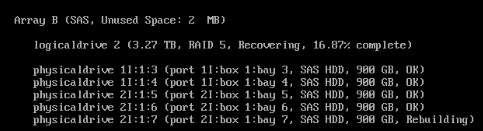
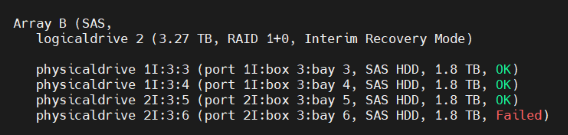
'SERVER > HPE' 카테고리의 다른 글
| 3PAR 노드 초기화 (0) | 2025.12.24 |
|---|---|
| 디스크 초기화/리빌딩 기록 (0) | 2025.11.03 |
| redfishtool (iLO) (2) | 2025.08.27 |
| [HPE] ilorest 명령어 (0) | 2025.07.29 |
| [HPE] 각종 소프트웨어 정리 (0) | 2025.07.08 |